
First Impressions: Testing CustomGPT.ai for ToolStacked
If you’ve been exploring the growing world of conversational AI, you’ve probably come across CustomGPT.ai. Marketed as an easy way to build AI agents in minutes, this platform promises a simple setup, flexible data import options, and intelligent responses. As part of testing tools for ToolStacked, I signed up for the trial to see how it really performs.
Getting Started With CustomGPT.ai
One of the biggest selling points of CustomGPT.ai is its claim that you can build an AI agent in five minutes or less. From my experience, this isn’t an exaggeration. The sign-up process was straightforward, and while the platform does collect your payment method upfront, you’re given a 7-day free trial to test the waters. Just remember: if you don’t cancel before the trial ends, you’ll be automatically billed.
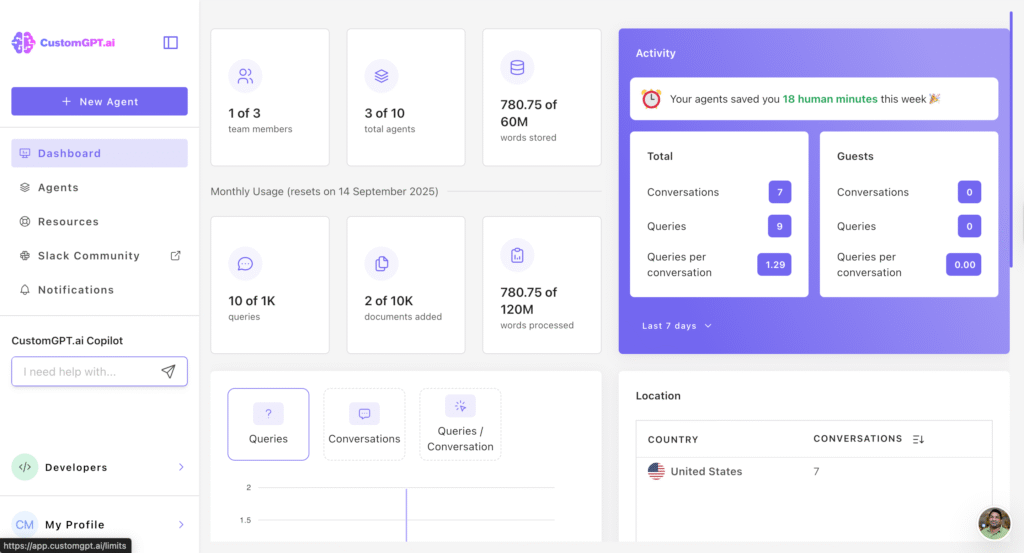
Once inside, I was greeted with a clean, simple dashboard. The UI feels intuitive and provides plenty of useful insights into your AI agents. Compared to other chatbot platforms I’ve tested, CustomGPT.ai strikes a nice balance between simplicity and depth.
Data Import: Feeding Your AI Agent
Where CustomGPT.ai shines is in how it lets you train your AI agent. There are several ways to import data:
- Connecting a website
- Uploading a file (like PDFs, Word docs, or CSVs)
- Leveraging structured content
For my first test, I tried importing data from the ToolStacked website. Because the site doesn’t yet have a dedicated FAQ section, the results weren’t as strong as I hoped. However, when I switched to a Microsoft Excel CSV file—similar to the flows I had built in Tidio—the results were impressive.
The agent interpreted the data smoothly and provided accurate, conversational answers when I asked questions about the tools featured on ToolStacked. This suggests that structured data, like spreadsheets or organized FAQs, makes a big difference in agent performance.
Comparing CustomGPT.ai to Tidio
I’ve previously used Tidio to design conversational flows for ToolStacked, and it’s a solid chatbot builder. But CustomGPT.ai feels different.
- Tidio → Great for general information, quick customer support responses, and drag-and-drop flow design.
- CustomGPT.ai → Stronger for conversational depth. It works more like an AI assistant than a traditional chatbot, drawing insights directly from your data.
In my opinion, CustomGPT.ai positions itself as more than just a support bot. It feels like a tool for building knowledge-based conversational agents that can adapt, interpret, and respond with accuracy and precision.
Plans, Pricing, and Considerations
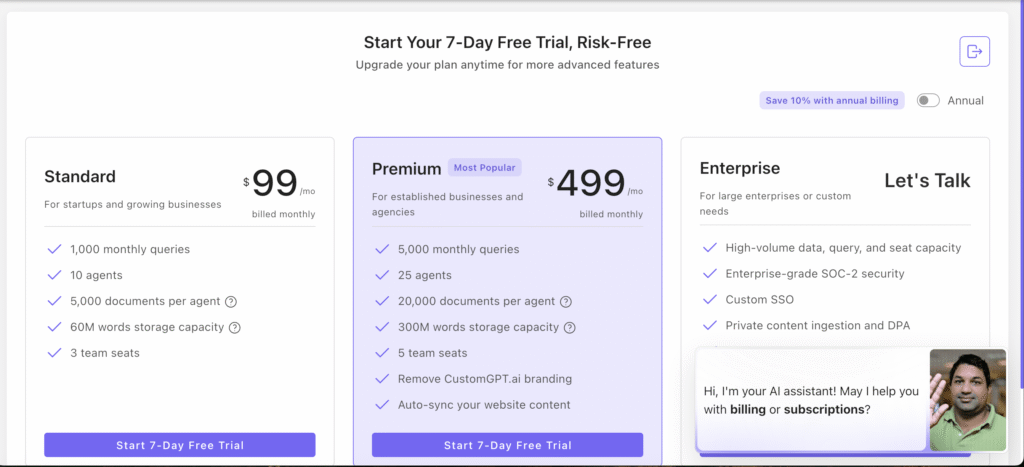
CustomGPT.ai offers several plans depending on your needs. The standard plan is $99 a month, while the premium plan is listed at $499 a month. The Enterprise plan says Let’s talk. The trial makes it easy to explore the platform before committing. The biggest watch-out: since they collect payment details upfront, make sure you cancel before the 7-day trial ends if you decide it’s not for you.
My Early Verdict
Overall, my first impression of CustomGPT.ai is positive. The platform is:
- ✅ Easy to set up (AI agent in under 5 minutes).
- ✅ Intuitive to use with a clean, simple UI.
- ✅ Flexible with multiple data import methods.
- ✅ Strong in conversational accuracy, especially when fed structured data.
For my ToolStacked use case, it excelled when paired with structured CSV data, giving accurate and context-aware responses about digital tools. It is a strong complement to, rather than a replacement for, traditional chatbot builders like Tidio.
I’ll be testing CustomGPT.ai more deeply in the coming days and plan to provide a detailed score and review once I’ve had more time to evaluate its performance across different use cases.
If you’re looking for a conversational AI tool that’s quick to set up and capable of handling knowledge-rich interactions, CustomGPT.ai is definitely worth trying during its free trial.






13 Comments