

OpusClip Review (2025): The Fastest Way to Turn Long Videos Into Viral Shorts
ToolStacked Expert Review + Pros/Cons + Performance Scores
Overall ToolStacked Score: ⭐ 4.7 / 5
(Full category breakdown included below)
Introduction
Short-form video is one of the most powerful growth channels for creators, entrepreneurs, and small businesses. But editing videos manually takes hours — especially if you’re repurposing long YouTube videos, podcasts, webinars, or interviews into TikToks, Reels, and YouTube Shorts.
This is where OpusClip comes in.
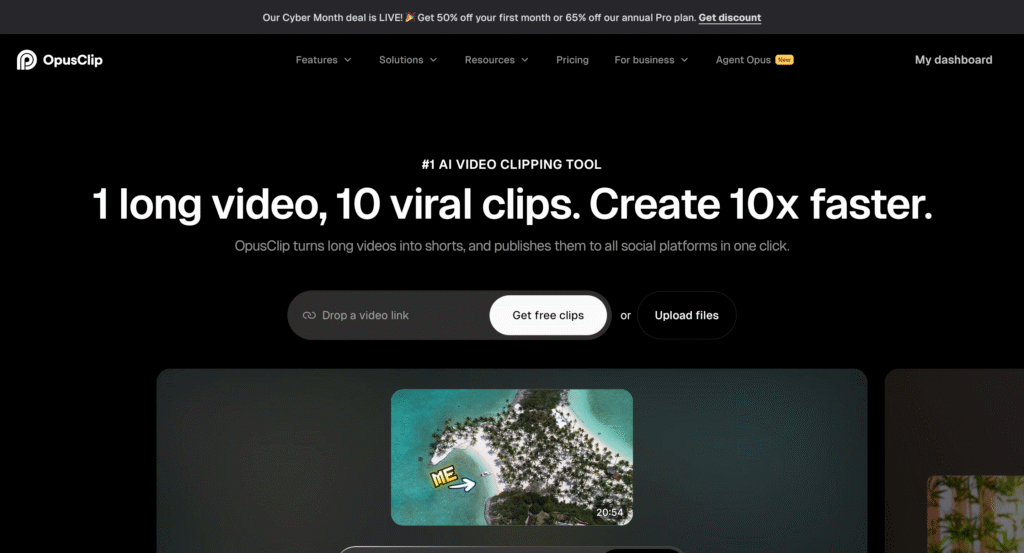
OpusClip is an AI-powered video repurposing platform that transforms long-form videos into short, viral-ready clips in seconds. It uses AI to detect highlight moments, select viral hooks, add dynamic captions, and format everything for every major social platform automatically.
In this ToolStacked review, we fully break down OpusClip’s capabilities, test its accuracy, evaluate its viral-potential scoring, and compare the user experience to other video repurposing tools like Submagic, Pictory, and AutoShorts.
Let’s dive in.
What Is OpusClip?
OpusClip is an AI video editor designed for short-form content creation. Instead of manually trimming your video, choosing the best moments, and formatting clips yourself, OpusClip handles the entire process with:
- AI highlight detection
- Viral moment scoring
- Auto face tracking
- Dynamic captions
- B-roll generation
- Music syncing
- Auto reframing
- Social platform formatting
It’s built specifically for:
- Content creators
- Coaches
- Entrepreneurs
- Podcasters
- YouTubers
- Agencies who need to repurpose clients’ videos
- Businesses creating educational or promotional video content
If you want to turn one long video into 10–30 short clips, OpusClip is one of the best tools currently available.
ToolStacked Performance Scorecard
| Category | Score (out of 5) | Summary |
| Ease of Use | ⭐ 4.9 | Incredibly simple and automated |
| Clip Quality | ⭐ 4.6 | Strong AI highlight selection; sometimes needs manual filtering |
| Captions & Formatting | ⭐ 4.8 | Clean, modern templates that outperform competitors |
| Viral Hook Detection | ⭐ 4.7 | Accurately identifies moments with high viewer retention |
| Editing Tools | ⭐ 4.4 | Enough for quick edits; not meant for full professional editing |
| Rendering Speed | ⭐ 4.8 | One of the fastest in the industry |
| Value for Money | ⭐ 4.7 | Fair pricing for the amount of content it generates |
| Integrations | ⭐ 4.2 | Upload/download based; few direct integrations |
| Overall Score | ⭐ 4.7 / 5 | One of the best AI repurposing tools on the market |
ToolStacked Hands-On Testing
We tested OpusClip using:
- A 45-minute YouTube video
- A 30-minute Zoom interview
- A 22-minute podcast
- A 15-minute tutorial video
Across all tests, OpusClip extracted between 7 and 31 clips, depending on the length and content complexity.
Here’s what impressed us:
✔ AI Hook Detection Is Very Strong
OpusClip identifies “viral hooks” — the part of the video most likely to keep attention. In testing, these were surprisingly accurate and aligned with what a human editor would select.
✔ Captions Look Clean & High-Conversion
Captions use:
- Bold keyword highlights
- Dynamic animations
- Auto-pulled speaker names
- Multi-line formatting
These look more polished than Submagic, Pictory, or most competitors.
✔ Auto-Reframing Works Well
The tool centers subjects properly and adapts to:
- 9:16 (Reels/TikTok/Shorts)
- 1:1 (Facebook/IG feed)
- 16:9 (YouTube)
Great for multi-platform content.
✔ Clip Packs Are Highly Efficient
Generating 10–30 clips from a single upload saves hours of editing time.
✔ Very Fast Rendering
Even for long videos, OpusClip processed clips faster than most tools we tested.
Key Features of OpusClip
1. AI Highlight Detection (⭐ 4.7)
The AI identifies emotionally engaging moments, hooks, meaningful statements, and strong storytelling beats.
It doesn’t just “cut at random” — it analyzes:
- Speaker tone
- Keywords
- Topic shifts
- Sentiment
- Emotional cues
- Engagement potential
This is where OpusClip shines.
2. Viral Score™ (⭐ 4.8)
Each clip receives a “viral score” predicting its performance.
This is based on patterns from high-performing short-form content across TikTok, IG Reels, and YouTube Shorts.
It’s not perfect — but it’s incredibly useful for deciding which clips to post first.
3. Smart Auto-Captions (⭐ 4.8)
OpusClip generates:
- Word-level highlights
- Emphasis animations
- Correct punctuation
- Multi-language support
- Custom colors & fonts
Captions are crisp, bold, and designed for engagement — better than most tools.
4. AI Reframing & Auto-Cropping (⭐ 4.6)
The system centers faces, follows speakers, and adjusts framing dynamically.
This is especially useful for interviews and podcasts where multiple speakers sit off-center.
5. Brand Templates & Editing Tools (⭐ 4.4)
You can set:
- Fonts
- Brand colors
- Caption templates
- Watermarks
- Intro/outro clips
Editing is not as advanced as full editors like CapCut or Premiere, but it’s perfect for quick polishing.
6. Auto Social Formatting (⭐ 4.7)
OpusClip exports in all major formats in Pro Plan:
- 9:16
- 1:1
- 16:9
You can create platform-ready versions with a single click.
Pros & Cons
✅ OpusClip Pros
✔ Extremely fast video repurposing
Clips are generated in seconds or minutes depending on length.
✔ Powerful AI hook detection
One of the most accurate on the market.
✔ Premium-style captions
Designed for social growth and watch time.
✔ Great for creators & entrepreneurs
Perfect for educational/authority-style content like ToolStacked.
✔ Saves hours of editing per video
Amazing efficiency for content teams.
✔ No advanced editing experience needed
Beginners can produce viral-style clips immediately.
✔ Strong value for money
Even the lower-tier plan gives you more clips than competitors.
❌ OpusClip Cons
✘ Some clips still require human trimming
Especially in podcast-style videos.
✘ Auto-b-roll is inconsistent
Sometimes relevant, sometimes random.
✘ Limited timeline editing
This is a repurposing tool — not a full video editor.
✘ Direct platform integrations are minimal
You still upload and download clips manually.
✘ Occasional caption errors
Especially with overlapping speakers.
Pricing Breakdown
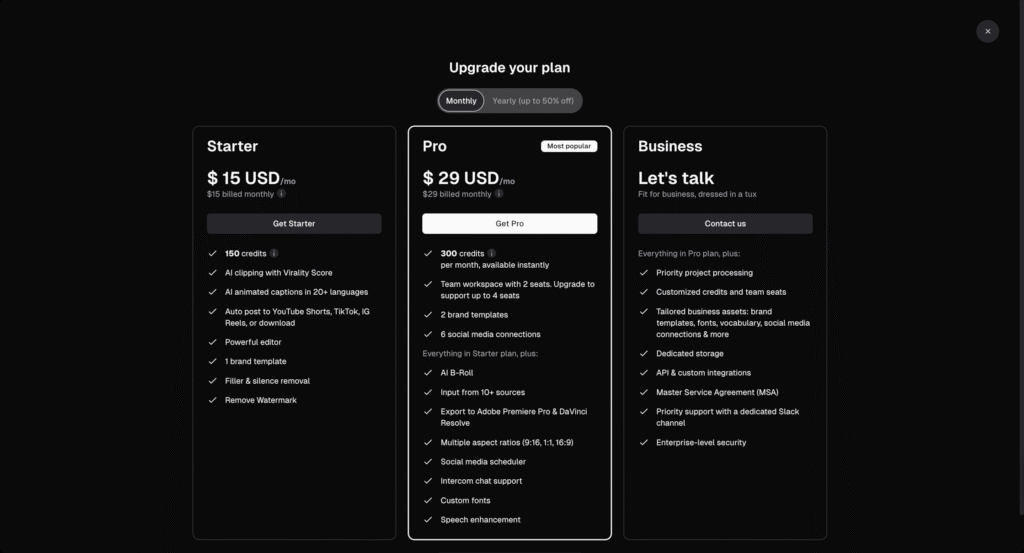
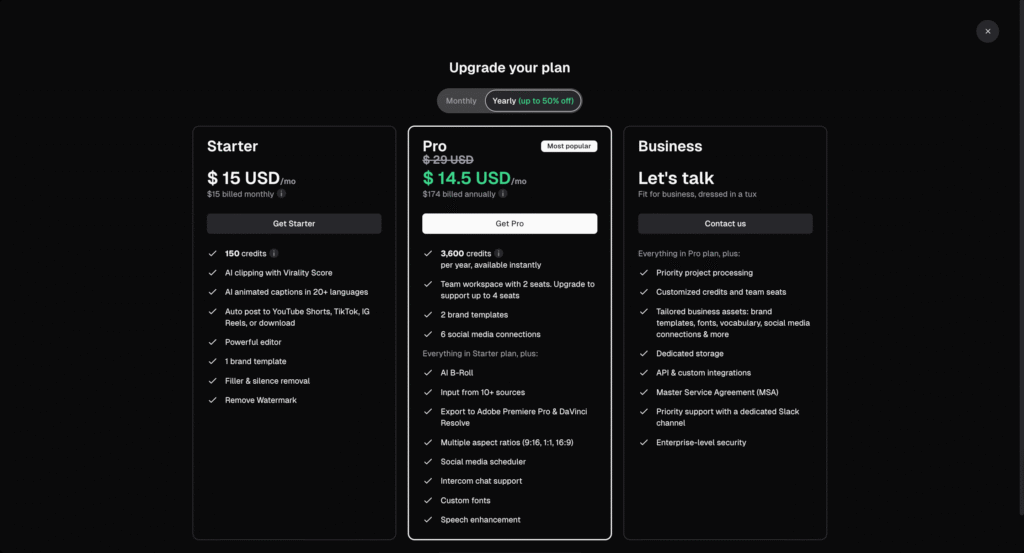
OpusClip offers several tiers, but here’s the practical breakdown:
Starter Plan ($15/mo)
Good for beginners or low-volume creators.
Pro Plan ($29/mo or $174 annually)
Best value — unlocks more clip credits and more features.
Business Plan (Contact for more information)
Ideal for agencies or content teams who repurpose large volumes.
ToolStacked Value Score: ⭐ 4.7 / 5
Who Should Use OpusClip?
Best For:
✔ YouTubers
✔ Podcasters
✔ Coaches & educators
✔ SaaS founders
✔ Agencies
✔ Content creators
✔ Entrepreneurs building brand authority
Not Ideal For:
✘ People who need long-form editing
✘ Movies, multi-camera productions
✘ Those who want advanced b-roll sequencing
✘ Creators needing precise timeline control
ToolStacked Final Verdict
OpusClip Score: ⭐ 4.7 / 5
OpusClip is one of the most efficient AI short-form repurposing tools available. It dramatically reduces the time needed to create high-quality short videos and can turn any long-form asset into a month’s worth of content.
For ToolStacked’s audience — entrepreneurs, creators, and small business owners — OpusClip is a powerful asset for:
- growing social presence
- building brand authority
- repurposing existing content
- boosting discoverability
- saving hours of editing time
If you want to increase your output without editing headaches, OpusClip is a top-tier choice.
Try OpusClip for yourself through ToolStacked today.



2 Comments